Quick Start Guide
Get up and running with EdgarTools in 5 minutes. By the end, you'll have a company's financial statements in Python.
Prerequisites
- Python 3.8 or higher
- Internet connection
- Basic familiarity with Python
Step 1: Install EdgarTools
pip install edgartools
Trouble importing?
If you see ImportError: cannot import name 'get_filings' from 'edgar', you may have installed the wrong package. There is an unrelated package called edgar on PyPI. Fix it with:
pip uninstall edgar && pip install edgartools
Step 2: Set Your Identity
The SEC requires all API users to identify themselves. Set your identity once:
from edgar import set_identity

# Use your name and email (required by SEC)
set_identity("John Doe john.doe@company.com")
Tip: You can also set the EDGAR_IDENTITY environment variable to avoid doing this in every script.
Step 3: Get a Company
Look up any public company by ticker symbol or CIK number:
from edgar import Company

company = Company("AAPL")  # Apple Inc.

See Apple's filings, financials, and insider trades on edgar.tools — no code required →
You can access basic company data as properties:
company.industry        # 'ELECTRONIC COMPUTERS'
company.shares_outstanding  # 15115785000.0
company.public_float    # 2899948348000.0
Step 4: Get Financial Statements
This is the most common task — getting a company's financial statements:
financials = company.get_financials()

# The three financial statements
income    = financials.income_statement()
balance   = financials.balance_sheet()
cashflow  = financials.cashflow_statement()
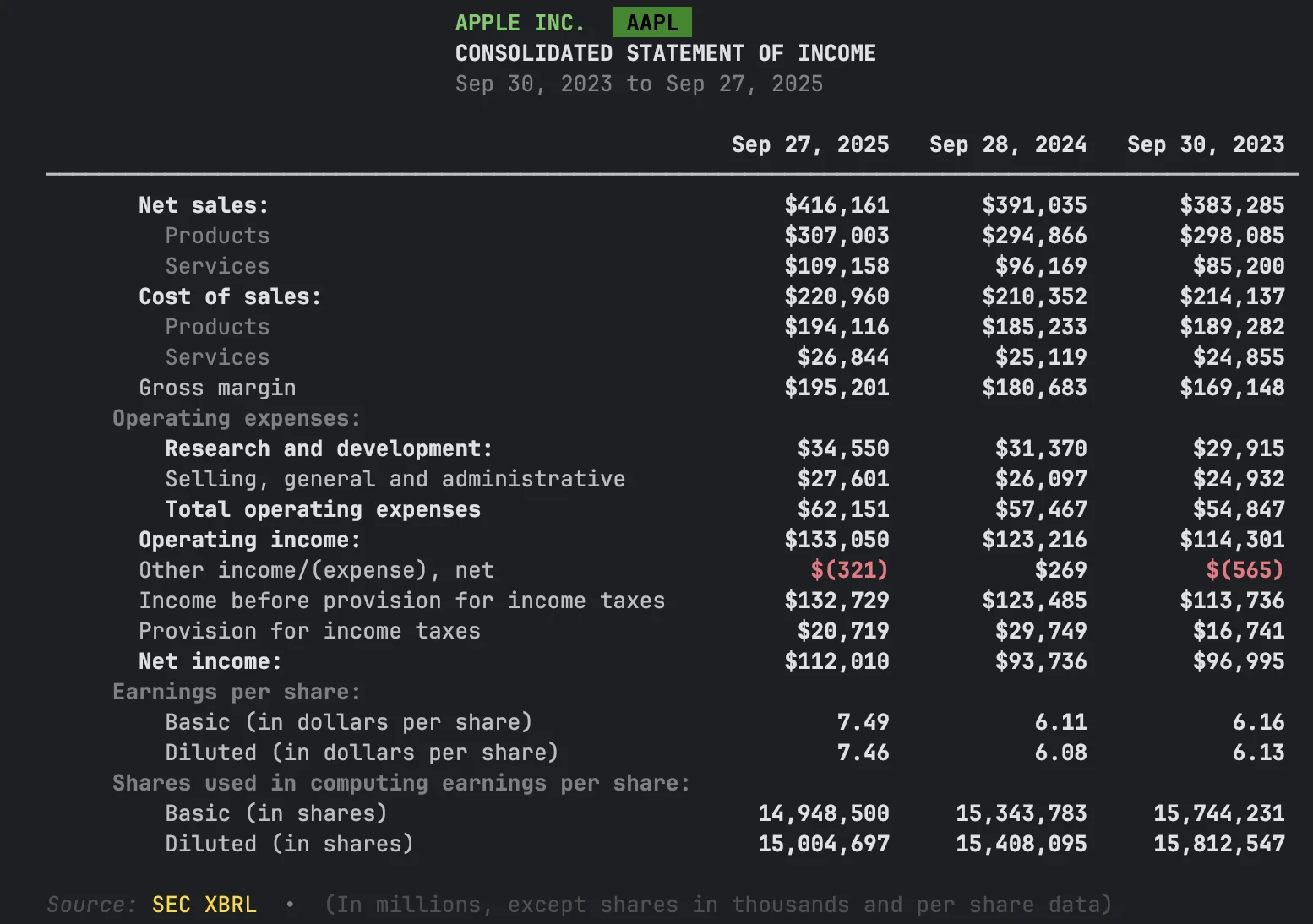
That's it — three lines to get any company's income statement, balance sheet, or cash flow.
Common gotcha
The canonical method is cashflow_statement(), but cash_flow_statement() also works.
All three statements: income_statement(), balance_sheet(), cashflow_statement().
Step 5: Get Specific Values
Need just one number instead of the full statement?
financials.get_revenue()
# 391035000000

financials.get_net_income()
# 93736000000
Step 6: Export to DataFrame
Every financial statement converts to a pandas DataFrame for further analysis:
df = financials.income_statement().to_dataframe()
You can also export company filings:
filings = company.get_filings()
df = filings.to_pandas()
Step 7: Browse Company Filings
Retrieve and filter a company's SEC filings:
# Get all filings
filings = company.get_filings()

# Filter by form type
tenk_filings = company.get_filings(form="10-K")

# Get the latest 10-K as a data object
tenk = company.latest("10-K")

How EdgarTools Is Organized
Here's a map of the main objects. Use it as a reference when you want to try something new:
Company("AAPL")                        # Start here — look up a company
  ├── .get_financials()                  # Annual financials from 10-K (RECOMMENDED)
  │     ├── .income_statement()          #   Revenue, expenses, profit
  │     ├── .balance_sheet()             #   Assets, liabilities, equity
  │     ├── .cashflow_statement()        #   Cash in and out
  │     ├── .get_revenue()               #   Quick: just the revenue number
  │     └── .get_net_income()            #   Quick: just net income
  │
  ├── .get_quarterly_financials()        # Quarterly financials from 10-Q
  │     └── (same interface as above)
  │
  ├── .get_filings(form="10-K")          # Browse SEC filings
  │     ├── .head(5)                     #   See the first 5
  │     ├── .latest()                    #   Get the most recent one
  │     └── [0].obj()                    #   Parse into a data object (TenK, etc.)
  │           ├── .auditor               #     Auditor name, PCAOB ID, location
  │           └── .subsidiaries          #     Subsidiaries from Exhibit 21
  │
  └── .get_facts()                       # Historical data (for 4+ years of trends)
        ├── .income_statement()          #   Multi-year income data
        └── .balance_sheet()             #   Multi-year balance sheet
See it live on edgar.tools
The code above runs locally. edgar.tools puts the same data in a web UI with AI enrichment on top — no code required.
- Browse Apple's filings, financials, and insider trades →
- Watch filings arrive in real time →
- Search disclosures across 12 XBRL topics →
Also includes a REST API (20+ endpoints), hosted MCP server, and data exports. Free tier: 100 API calls/day.
Step 8: Next Steps
You just learned how to install EdgarTools, look up a company, get financial statements, and browse filings. Here's where to go next:
Financial Data
- Choosing the Right API — Which method to use for your task (start here!)
- Financial Statements Guide — Income statements, balance sheets, cash flow in depth
- Extract Statements from Filings — XBRL data extraction
- Company Facts — Historical financial data across all filings
Companies & Filings
- Find a Company — Search by name, ticker, CIK, industry, or exchange
- Working with Filings — Open, view, and parse any SEC filing
- Search & Filter Filings — Find exactly the filings you need
Filing Types
- Annual & Quarterly Reports — 10-K and 10-Q data objects
- Current Events (8-K) — Material events and press releases
- Insider Trades (Form 4) — Monitor insider transactions
- Institutional Holdings (13F) — Who owns what
Reference
- Cheat Sheet — Common operations at a glance
- Notebooks — Interactive Colab tutorials you can run in your browser
Getting Help
- Documentation: Browse our comprehensive guides
- GitHub Discussions: Ask questions and share insights
- Issues: Report bugs or request features
Support EdgarTools
If you found this quickstart helpful, consider supporting EdgarTools development:
